Most established HVAC companies already have the basics in place: a website, a Google Business Profile, and some marketing running in the background. The harder question is which SEO problem deserves attention first.
HVAC SEO helps homeowners who need heating or cooling service find your company in Google Search and Google Maps, and then contact you. Those are separate outcomes. A page can rank without earning clicks, and a click can turn into a call that never becomes a booked job.
These 19 HVAC SEO tips cover what to check and fix across Google visibility, your Business Profile, service and city pages, mobile usability, reviews, and lead measurement. Each tip explains what to inspect, how to read what you find, and what to do next.
You don’t need to work through them in order. Start with the tip that matches the problem you’re seeing right now.
1. Check Whether Google Has Indexed Your Most Important HVAC Service Pages
Google can only show a page in search results if that page is in Google’s index. Before you write new content or invest in links, confirm that your AC repair, furnace repair, and installation pages are actually indexed. A page that isn’t indexed can’t appear in Google Search.
Indexing makes a page eligible to appear. It doesn’t make the page rank. Google’s URL Inspection documentation states that a “URL is on Google” status doesn’t guarantee the page will show up in results.
Which pages to check first
Start with the pages that bring in jobs, not the blog:
- AC repair
- AC replacement or installation
- Furnace repair
- Furnace replacement or installation
- Heat pump services, if you offer them
- Maintenance or tune-up pages
- Your most important service-area or city pages
- Your contact or booking page
How to inspect a URL in Search Console
- Get access to your Search Console property. If a web developer or agency set it up, ask them to add you as a user.
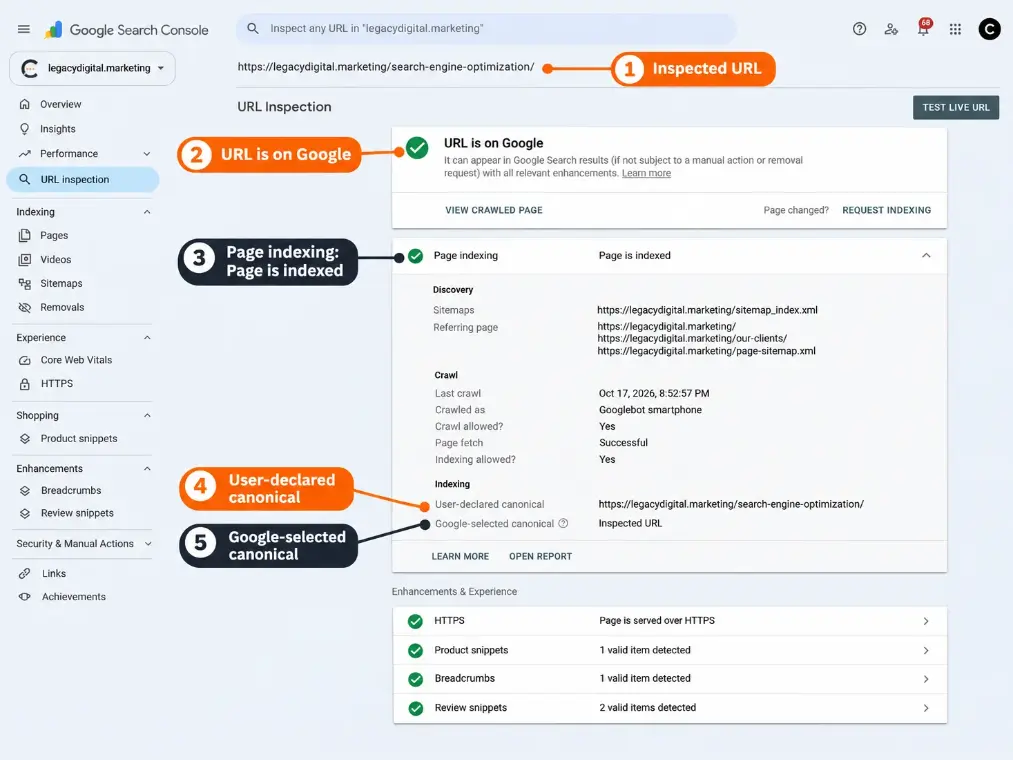
- Paste the full live URL into the inspection bar at the top of Search Console.
- Read the top-line status: “URL is on Google” or “URL is not on Google.”
- Open the page indexing details. Note how Google discovered the page, when it last crawled it, and whether crawling and indexing were allowed.
- Compare the two canonical fields. The user-declared canonical is the URL your page says is the main version. The Google-selected canonical is the URL Google chose.
- Run a live test if the page is new or recently changed. It confirms whether Google can access the page now. It doesn’t confirm the page will be indexed.
- Decide whether to request indexing. If the page is new or recently updated and the live test shows it can be indexed, requesting indexing is a reasonable step. If the page has been live for a while and still isn’t indexed, look at the details first so you know why. Google applies a daily limit to requests, a request doesn’t guarantee inclusion, and for many new or updated pages at once, Google recommends submitting a sitemap instead.
The inspection report reflects Google’s most recently indexed version of the page, not necessarily the page as it looks today.
What the result tells you
- “URL is on Google,” and the Google-selected canonical is the URL you expected. Indexing isn’t the problem for this page. Look at keyword relevance (Tip 7) or local visibility (Tip 2).
- “URL is not on Google” on a new or recently updated page. Google may not have processed it yet. Check that other pages link to it (Tip 11) and consider requesting indexing.
- “URL is not on Google,” or a different Google-selected canonical, on an established page. You’ve identified a page that needs investigation. Tip 12 covers how to narrow down the cause.
Not every non-indexed URL is a problem. A form thank-you page or an old URL that now redirects is often excluded on purpose. And a page that isn’t indexed doesn’t necessarily have weak content. The cause can be technical, intentional, or simply timing.
Illustrative example: An HVAC company’s furnace repair page has been live for months and is linked from the main menu, yet URL Inspection shows “URL is not on Google.” The indexing details report that indexing isn’t allowed because of a noindex directive. That’s evidence, not a guess. The owner’s next step is to ask the web developer whether the directive was intentional, rather than rewriting the page or requesting indexing.
An owner can run this inspection. Fixing the cause is often developer or technical SEO work.
2. Test Where Your HVAC Business Actually Appears in Google Maps
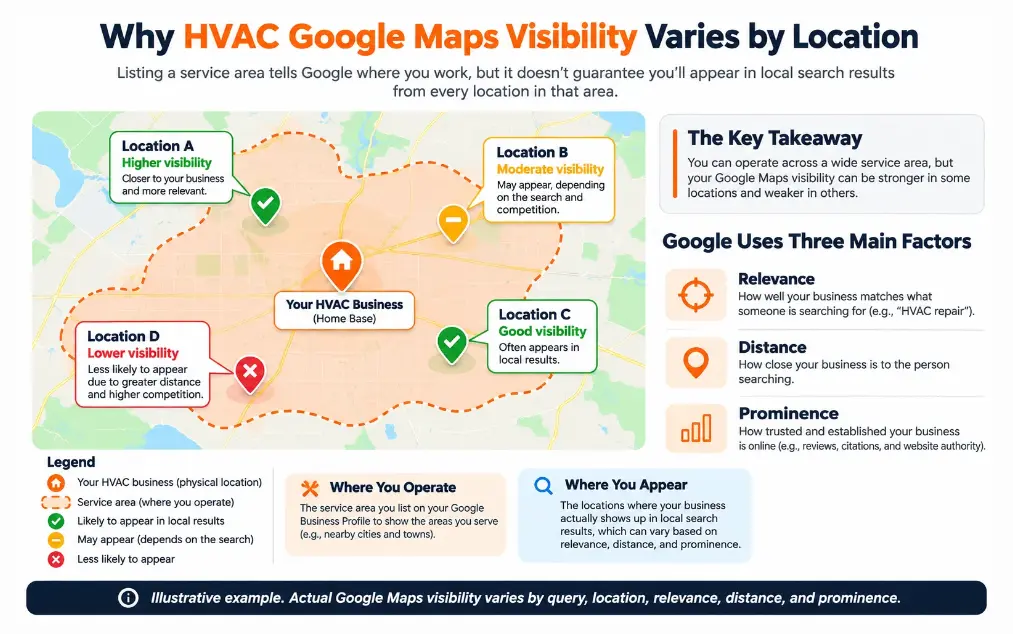
Adding a city to your Google Business Profile service area tells customers where you work. It does not guarantee that your company will appear in Google Maps when someone in that city searches for AC repair. Google ranks local results using relevance, distance, and prominence, so your visibility near your shop and your visibility at the edge of your service area can look very different.
The three factors Google names
According to Google’s local ranking guidance:
- Relevance is how well your Business Profile matches what someone searched for.
- Distance is how far your business is from the person searching. If the searcher doesn’t specify a location, Google estimates it from what it knows.
- Prominence is how well known your business is. Google says more reviews and positive ratings can help local ranking.
Google also states there is no way to request or pay for a better local ranking. It doesn’t publish how much weight each factor carries.
What service-area settings do and don’t do
Google lets a business set up to 20 service areas and says the overall area shouldn’t extend more than about two hours of driving time from where the business is based. Google describes service areas as information that helps people find your profile. It doesn’t say that listing a city earns rankings there.
That explains one of the most common owner frustrations: “We list that town, so why don’t we show up there?”
How to test your real Maps visibility
- Pick four to six genuine service locations. Include your home base, a few towns where you want more work, and one near the edge of your service area.
- Choose two or three searches per location that match jobs you want, such as “ac repair,” “furnace repair,” and “hvac company.”
- Search from inside each location. The simplest method is to ask technicians already working in those towns to search on their phones while on site, using a private browser window, and screenshot the local results.
- Record what you see. Does your company appear? Roughly where? Which competitors appear above you, and do they have a physical office nearby?
- Repeat on different days before drawing conclusions. Local results vary by search location, query, and device, so one search proves very little.
Geo-grid rank tracking tools can speed this up by estimating rankings across a map grid. They’re useful for spotting patterns over time. Treat their numbers as estimates from simulated locations, not data reported by Google.
How to read the pattern
Illustrative example: A contractor based in Town A also serves Towns B through E. Technicians’ searches show the company near the top in Towns A and B, but not in D and E, which are farther from the office and have competitors with local offices. Before treating that as an optimization failure, the owner confirms the profile is accurate and the website has useful information about service in D and E. If both check out, the pattern may simply reflect distance.
Don’t create a fake office or move your map pin to get closer to a target town. Tip 4 explains why.
3. Make Every HVAC City Page Useful Beyond the City Name
A city page earns its place when it tells a homeowner in that city something true and useful that your main service page doesn’t. If the only thing that changes from one city page to the next is the city name, the page probably isn’t helping customers. At scale, that pattern can resemble what Google calls doorway abuse.
Why contractors build city pages, and where the risk starts
Wanting to be found in the towns you serve is a legitimate goal. The risk comes from how the pages are built.
Google’s spam policies describe doorway abuse as pages created to rank for specific, similar search queries that lead users to intermediate pages less useful than the final destination. One listed example is “pages targeted at specific regions or cities that funnel users to one page.”
Not every city page is a doorway. But a large set of pages that say the same thing with a different town name in each is hard to defend as useful. Google’s guidance on helpful content also asks whether content provides original information and shows first-hand expertise.
The city-name interchangeability test
Here’s a simple check you can run on any city page. It is editorial guidance, not a test Google has published.
Read the city page and mentally swap in a different city name. If every sentence would still be equally accurate, the page needs more location-specific substance.
What counts as real local substance
Use only details that are true for your company:
- Which services you offer in that area, and any you don’t
- How scheduling or dispatch works there, if it differs from other areas
- Real projects completed in that area, with customer permission for any photos or details
- Genuine reviews from customers in that area
- Conditions your technicians actually encounter there, such as common equipment or home types, if your team can confirm them
- Permit or inspection steps you handle in that municipality, if you handle them
Generic vs. Genuinely Useful City Pages
| Factor | Generic City Page | Genuinely Useful City Page |
|---|---|---|
| Opening | “Looking for reliable AC repair in [City]? Our expert technicians serve [City] homeowners.” | States which services are available in [City] and how to request one. |
| Service Details | Same list as every other city page. | Notes services or scheduling details specific to that area. |
| Proof | Generic “trusted by homeowners” claims. | Verified local project examples or reviews, used with permission. |
| Local Context | The city name repeated several times. | Conditions or requirements your team has actually seen there. |
| Interchangeability Test | Fails. Every sentence works for any city. | Passes. Several sentences would be wrong for a different city. |
The City-Name Test
If replacing the city name leaves the entire page equally accurate, review whether the page provides sufficient local value.
This is an editorial quality check, not an official Google ranking requirement.
What to do with a page that fails the test
A failed test tells you the page needs attention. It doesn’t decide the fix on its own. Your options:
- Improve the page with verified local details if you genuinely serve that area and have something specific to say.
- Consolidate it into a broader service-area page, if the page adds nothing a broader page couldn’t cover.
- Hold off on new pages for areas where you don’t yet have anything specific to add.
Before removing or redirecting any existing city page, check what it currently does for you:
- Its purpose, and whether customers or staff rely on it
- Its visibility and clicks in Search Console
- Its traffic and any inquiries it produces
- Links pointing to it from other websites
- How it relates to your service pages and other location pages
If you do consolidate, redirect the old URL to the page that genuinely covers that town and service, not to your homepage by default.
Some shared wording across location pages is normal and doesn’t automatically lead to a penalty. The concern is a large set of pages that exist mainly to rank rather than to help.
4. Verify That Your Google Business Profile Matches How Your HVAC Company Operates
Your Google Business Profile should describe how your HVAC company actually serves customers: technicians traveling to homes, customers visiting an office, or both. A profile that misrepresents this can run into eligibility problems that no amount of optimization will fix.
Service-area, storefront, or hybrid
- Service-area business. Technicians go to the customer, and customers don’t visit your office. Google’s guidelines for representing your business say a service-area business should hide its address. Set a service area instead.
- Storefront. Customers visit a staffed location during the hours you list.
- Hybrid. You serve customers at your location and also travel to them. You can show the address and set a service area.
Eligibility rules that trip up contractors
Google’s guidelines are specific about a few points:
- The business must make in-person contact with customers during its stated hours.
- P.O. boxes and mailboxes at remote locations aren’t acceptable addresses.
- A location where the business doesn’t actually operate isn’t eligible for a profile.
- When Google requires verification, complete it for the real location or service area.
A five-minute operations check
Compare your public profile with how the business really runs:
- Do customers actually come to our office?
- If the address is visible, is that location staffed during the hours we list?
- Is the address a place where we genuinely operate, not a mailing address or shared virtual office?
- Does our service area reflect where we actually dispatch technicians?
- Is there more than one profile for the same business location?
If any answer reveals a mismatch, correct the profile so it reflects reality.
Avoid shortcuts that create bigger problems: fake offices, duplicate profiles for each city, or moving the profile pin to appear closer to a target town. These conflict with Google’s guidelines and put the profile itself at risk.
5. Choose Google Business Profile Categories That Describe Your Actual HVAC Business
Google Business Profile categories describe what your HVAC company is, not every keyword you want to rank for. Google’s guidelines ask businesses to use as few categories as possible to describe the core business, and to describe the business as a whole rather than list every service it offers.
How to choose
- Identify your core business type. How would most customers describe your company in a few words?
- Set the primary category to the most specific option that accurately describes the business as a whole.
- Add a secondary category only for a genuine, distinct line of business. “We’d like to rank for it” isn’t a reason.
- Put individual jobs in the Services section. AC repair, duct cleaning, and thermostat installation are services, not separate business identities.
Google’s category list includes options such as “HVAC contractor,” “Air conditioning contractor,” and “Heating contractor.” The list changes over time, so check what’s available inside your own profile.
Illustrative example: An HVAC company offers repair, installation, and maintenance for both heating and cooling systems. The owner asks what customers would call the business, and the honest answer is an HVAC contractor. Repair, installation, and maintenance are things that business does, so they belong in the Services section. A secondary category would only make sense if the company also ran a substantial, separate line of business.
Avoid unnecessary category changes
Frequent category edits make it hard to tell what caused any later change in visibility. If you adjust categories, change one thing at a time and record the date.
6. Keep Your HVAC Services, Hours, and Contact Details Accurate
Outdated hours, a disconnected phone number, or a service you no longer offer can send a customer to a competitor before they ever reach you. Your Business Profile and your website should present the same information, and both should match how your dispatch actually works.
What to check
- Services. List what you actually provide today. Remove anything you’ve stopped offering.
- Regular hours. Google’s guidelines ask for your regular customer-facing hours.
- Special hours. Add holiday hours and planned closures before they happen.
- Phone number. Confirm it reaches a person or a monitored line.
- Website link. Make sure it points to the right page, especially if you run more than one location.
- Contact details on key pages. Every major service page should make it easy to call or request service.
- Emergency or after-hours service. List it only if you genuinely offer it, and describe it accurately. If “after hours” means a callback the next morning, say so.
The practical check
Put your Business Profile, website header and footer, contact page, and current dispatch schedule side by side. Note every difference. Then call your listed number outside business hours and see what a customer actually experiences.
7. Target HVAC Keywords That Match the Customer’s Actual Job
The most useful HVAC keywords describe the jobs you want to book. “AC repair” and “AC replacement” sound similar, but the homeowner behind each search is in a different situation and needs different information before calling you.
Different searches, different customers
Search examples are illustrative. They aren’t search volume or conversion claims.
How to map keywords to pages
- Separate broad and specific searches. “HVAC” is broad. “AC repair” names a job.
- Use location terms where they’re accurate. Mentioning the areas you serve is useful. Stuffing a list of town names into every heading is not.
- Check what people actually search. In Search Console, open the Performance report, go to the Pages tab, select a service page, then switch to Queries. You’ll see the searches that page already appears for. Look for mismatches, like a repair page appearing mostly for DIY questions.
- Assign each search intent a primary page. The goal is a clear answer to “which page should a homeowner land on for this job?”
When two pages target similar terms
Two pages appearing for similar searches isn’t automatically a problem. A general cooling services page and a dedicated AC repair page can both appear for “ac repair” while serving different purposes. It’s worth a closer look when both pages answer the same customer need and Search Console shows them splitting impressions or alternating for the same queries without either performing well. Deciding whether to keep, differentiate, or merge those pages is covered in Tip 8.
8. Give Major HVAC Services Their Own Pages When the Search Intent Justifies It
A separate service page is worth building when the customer’s need is different enough to deserve its own answer. Repair and replacement usually qualify. Ten near-identical pages for minor keyword variations usually don’t.
When a separate page makes sense
Ask three questions:
- Is the urgency different? A homeowner with no heat on a cold night is in a different state of mind than one planning a system upgrade.
- Are the decision criteria different? Repair customers care about availability. Replacement customers compare options and costs.
- Does an existing page already answer the need well? If it does, improving that page may serve customers better than adding a competing one.
Illustrative example: A repair page should lead with availability, service area, and the fastest way to request service. A replacement page needs different information: the equipment options you actually install, how your estimate process works, what installation involves, and financing details if you genuinely offer financing. Forcing both into one page usually shortchanges one of those customers.
When consolidation may be the better choice
If two pages serve the same customer need and neither performs well, merging them into one stronger page is an option worth considering. Before you merge, compare both pages’ Search Console visibility, traffic, inquiries, and links from other websites, then keep the version that best serves the need and redirect the other to it.
Whichever pages you keep, make sure customers can reach them from your main navigation and from related pages.
9. Use Real Technician and Customer Questions to Improve Service Pages
Your dispatchers and technicians hear the same customer questions every week. Those questions, answered accurately on your service pages, are exactly the kind of first-hand detail that generic HVAC copy leaves out.
How to collect them
- Ask dispatchers and customer service staff to note recurring questions from calls over a couple of weeks.
- Ask technicians what customers ask on site and what they wish customers knew before the visit.
- Review emails, chat messages, and reviews for repeated concerns.
- Group the questions by service so each one lands on the right page.
- Write the answers with the people who know them, and verify every factual detail, such as pricing, warranties, and timelines, with whoever owns that policy.
- End each page with a clear next step, like calling or requesting service.
Illustrative example: A furnace repair page could answer questions like:
- Will the technician call before arriving?
- Is there a charge for the diagnostic visit, and does it apply toward the repair?
- How do you decide whether a repair is worth it on an older furnace?
- Do you service my furnace brand?
Each answer has to reflect your company’s actual policy. Don’t publish prices, warranties, or service capabilities you haven’t confirmed.
This approach lines up with Google’s helpful content guidance, which asks whether content clearly demonstrates first-hand expertise and depth of knowledge.
10. Improve Page Titles and Headings So Homeowners Understand Each Service
A homeowner should be able to tell what a page offers from its title and headings alone. Clear titles help Google understand the page too, although Google may change the title it displays in search results.
What to check
- Review the title and H1 of each major service page. Does each one name a single service clearly?
- Add location context where it’s accurate. “AC Installation in [Service Area]” is useful if you actually serve that area.
- Remove repeated boilerplate. Titles like “Best HVAC Company | Trusted Experts | Call Now” on every page tell Google and customers nothing about the specific page.
- Check the search snippet. Google says snippets are primarily created from the page content. It may use your meta description when that gives a more accurate summary, so don’t assume your exact wording will appear.
Google’s title link guidance recommends descriptive, concise titles and warns against keyword stuffing and repeated or boilerplate text. It doesn’t set a fixed character limit. Long titles are truncated in results as needed.
Illustrative example:
- Vague: “Services | [Company Name]”
- Descriptive: “AC Installation in [Service Area] | [Company Name]”
For a full page-level review, use our on-page SEO checklist.
11. Use Internal Links to Help Customers Find Related HVAC Services
Internal links help homeowners move from what they’re reading to the service they need. They also help Google discover your pages and understand how they relate to one another.
What to check
- Related services link to each other where it helps the customer, such as AC repair to AC replacement.
- Helpful articles link to the relevant service page. A post about strange furnace noises should point to furnace repair.
- City or service-area pages link to the services offered there.
- Anchor text describes the destination. Google’s link guidance suggests reading the anchor text on its own to see if it makes sense out of context. “Click here” fails that test.
- Links are real HTML links. Google can generally only crawl a link if it’s an <a> element with an href attribute. Buttons built another way may not be followed.
- Nothing important is broken. A site crawler can find broken links and redirect chains quickly.
Illustrative example: An article about preparing your AC for summer links to the company’s AC maintenance service page using the anchor “AC maintenance service,” not “learn more.”
There’s no target number of internal links. Add a link where a reader would reasonably want to go next.
12. Investigate Crawl and Canonical Problems Before Creating More Pages
When Tip 1 turns up an important page with an unexpected status, the next job is finding the specific cause before changing anything. Canonical tags, redirects, and noindex directives are powerful settings, and the wrong fix can remove a working page from Google.
The terms in plain language
- Crawling is Google visiting your page to read it.
- A canonical URL is the version Google treats as the main one when it finds similar pages. Google’s canonicalization documentation says it weighs signals such as redirects, rel=”canonical” tags, sitemap inclusion, and whether a page uses HTTPS. Your declared canonical is a preference, not an instruction.
- A redirect sends visitors and Google from one URL to another.
- A noindex directive tells Google not to include a page in search results.
- Robots.txt is a file that tells crawlers which parts of a site they can access.
Common statuses and what they may mean
These statuses appear in Search Console’s URL Inspection tool and Page indexing report. A status describes what Google observed. It doesn’t always point to a single cause, so treat the “may mean” column as a starting point for investigation.
Many of these are intentional exclusions, not errors. The question is always whether the status matches what you want for that specific page.
Illustrative example: an unexpected canonical
URL Inspection on an AC installation page shows the AC replacement page as the Google-selected canonical. That tells you Google currently treats the replacement page as the main version. It doesn’t, by itself, tell you why.
Possible explanations include:
- The two pages cover very similar ground.
- The installation page declares the wrong canonical.
- Redirects or the sitemap point toward the replacement URL.
- Most internal links point to the replacement page.
The owner and their SEO check each possibility before acting. Depending on what they find, the fix might be to make the pages more distinct, correct a tag or sitemap entry, or merge the pages as described in Tip 8.
Changes to canonical tags, redirects, robots.txt, or site-wide templates are specialist work. Don’t change them on a hunch.
13. Test Your HVAC Website’s Mobile Call Buttons and Contact Forms
Search visibility is wasted if a homeowner with a broken AC can’t reach you from their phone. Testing your call buttons and forms takes minutes and catches problems ranking reports won’t show.
How to test
- Use a real phone, not a resized desktop browser. Open your main service pages the way a customer would, from a Google search.
- Tap every call button. Confirm it opens the phone app with the correct number.
- Submit each form with a clearly marked test entry. Confirm who receives it, how quickly, and whether it lands where your team actually works, whether that’s an inbox or a CRM.
- Check that contact options are easy to find without scrolling past large images or popups.
- Read the confirmation message. If it promises a response time, check that your team meets it.
- Confirm stated availability matches operations. If the site says “available now,” someone should be.
- Repeat the test after website updates, plugin changes, or phone system changes.
Illustrative example: An HVAC company’s AC repair page gets steady summer visits, but the main call button has a formatting error and doesn’t open the phone app. The owner sees traffic without matching calls and assumes SEO isn’t working. The real problem is a broken button.
This is a conversion fix, not a confirmed ranking factor. It matters because it decides whether the visibility you already have turns into contact.
14. Fix Mobile Performance Problems That Actually Affect Your Customers
Use performance tools to find problems your customers can feel, like a service page that loads slowly on a phone or a call button that jumps as the page loads. A perfect score is not the goal.
How to run the check
Run PageSpeed Insights on your homepage and your most important service page. The report has two kinds of data:
- Field data comes from real Chrome users, when Google has enough of it for your page. Low-traffic pages may not have any.
- Lab data comes from a simulated test. It’s useful for diagnosing causes but doesn’t reflect every customer’s experience.
Core Web Vitals in plain terms
Google’s Core Web Vitals documentation defines three metrics:
Important:
Google evaluates Core Web Vitals using the 75th percentile of real-user experiences where sufficient data is available. Meeting these thresholds does not guarantee higher search rankings.
Google says Core Web Vitals are used by its ranking systems. Its page experience documentation also says Search “always seeks to show the most relevant content, even if the page experience is sub-par,” and that good results don’t guarantee top rankings.
What to prioritize
Focus on material problems: oversized images, heavy sliders, popups or chat widgets that delay the page, and layout shifts that move the call button. Keep performance fixes separate from design preferences. A page that looks plain but loads quickly and works well isn’t a performance problem.
15. Request Genuine Customer Reviews Without Using Manipulative Tactics
Ask genuine customers for honest feedback, consistently, without offering anything in return or steering what they write. Google’s review policies prohibit incentives for reviews, selectively soliciting positive reviews, and discouraging negative ones.
Google’s local ranking guidance says more reviews and positive ratings can help local ranking. It doesn’t publish a review count, frequency, or average rating that guarantees a particular result.
What Google’s policy prohibits
Google’s prohibited and restricted content policy includes these rules that apply directly to HVAC companies:
- Incentives. Offering payment, discounts, or free goods or services in exchange for posting a review.
- Selective solicitation. Selectively soliciting positive reviews, or discouraging or prohibiting negative ones.
- Staff review quotas. Requesting that staff solicit a certain number of reviews.
- Conflicts of interest. Content based on a conflict of interest, which can include current or former employment.
- Non-genuine content. Soliciting or encouraging content that doesn’t represent a genuine experience.
- Pressure on the premises. Requiring or pressuring customers to leave reviews while on the business’s premises.
If you run any technician program connected to reviews, check it against the staff quota rule before launching it.
Recommended practices
These go beyond the policy text. They’re conservative habits that keep requests clearly genuine:
- Ask customers after completed jobs as a routine, not only when you expect a good result. The wording can vary by channel or service.
- Don’t suggest keywords, phrases, or a star rating. Let the customer describe the experience in their own words.
- Send the request after the visit, so the customer can respond on their own time rather than with a technician waiting.
A neutral review request
Hi [First name], thanks for choosing [Company Name] for your [service] on [date]. We’d appreciate hearing about your experience. You can leave a review here: [review link].
Respond to reviews
Reply to genuine reviews, positive and negative. Thank customers, address specific concerns, and move disputes to a private conversation. Never include a customer’s personal details in a public reply.
16. Correct Inaccurate HVAC Business Listings That Could Confuse Customers
Old directory and association listings can still send customers to a disconnected number or an outdated website. Accuracy on the listings customers actually use matters more than the total number of listings you have.
How to find and fix problems
- Search for your company name and any old phone numbers to see where outdated information still appears.
- Prioritize listings customers actually use, such as Apple Business Connect, Bing Places, Yelp, the Better Business Bureau, your local chamber of commerce, trade associations, and manufacturer dealer locators if you’re a participating dealer.
- Check four details on each: business name, phone number, website, and address or service area.
- Correct errors through each platform’s claim or edit process.
- Skip mass directory submission services. Large batches of low-quality listings add maintenance work without helping customers find you.
Illustrative example: A contractor association directory still lists the phone number the company used before switching phone providers. Homeowners who find the company there reach a disconnected line. Updating that one listing fixes a real customer problem.
There’s no universal number of citations that guarantees better rankings. Focus on correcting the listings that matter.
17. Earn Relevant Local and HVAC Industry Links Instead of Buying Low-Quality Backlinks
The links worth pursuing come from organizations with a genuine reason to mention your HVAC company: suppliers, associations, community partners, and local media. Buying links to influence rankings violates Google’s spam policies.
Legitimate opportunities
- Manufacturer or distributor contractor locators, if you’re a genuine participating dealer.
- Trade associations and professional groups you belong to.
- Local partnerships and community involvement, like events and nonprofits you support. If a link is part of a paid sponsorship, Google’s policy says it should be qualified with rel=”sponsored” or rel=”nofollow”.
- Local and industry publications, where your team can offer practical guidance, such as what homeowners should check before the first cold snap.
- Useful educational resources on your own site that others may want to reference.
Earned links vs. link schemes
Google’s spam policies list practices such as buying or selling links for ranking purposes, exchanging goods or services for links, and paid articles containing links that pass ranking credit. Avoid any arrangement where the link itself is what you’re paying for.
Illustrative example: A company’s lead installer presents at a regional contractors association training session. The association’s event recap names the installer and links to the company’s website. That mention exists because of genuine participation and expertise.
No single link guarantees a ranking change. Treat earned mentions as a byproduct of real business activity, not a quota.
18. Update HVAC Content Around Real Heating and Cooling Service Demand
Review your heating pages before your local heating season and your cooling pages before cooling demand rises. The goal is accurate, useful content ready when homeowners start searching, not a burst of new posts.
When that happens depends on where you operate. Season timing, season length, and the mix of equipment your team services differ by region, so plan around your own market rather than a national calendar.
What to review
- List the pages tied to the coming season’s services, such as furnace repair, heating maintenance, or heat pump service.
- Check accuracy. Are the services, scheduling details, maintenance plan information, and seasonal hours still correct?
- Review existing pages before creating new posts. Updating a page that already gets visits is often faster than starting over. A new page still makes sense when you add a service or need to answer a question no existing page covers.
- Look at last year’s search patterns. Search Console keeps 16 months of performance data, so you can see when seasonal queries rose in your area last year. Google Trends can add context, but it shows relative interest, not search volume.
- Link helpful articles to the related service pages.
- Match content to capacity. If your schedule is already full for a service, pushing more content toward it may not be the best use of the season.
Illustrative example: In late summer, an HVAC company reviews its furnace maintenance page ahead of its local heating season. It finds last year’s maintenance plan details, an outdated scheduling note, and a popular “furnace won’t turn on” article that doesn’t link to the furnace repair page. Fixing those three issues takes less time than writing a new post and improves pages customers already find.
19. Measure Whether HVAC SEO Is Producing Qualified Calls and Booked Jobs
Rankings and organic traffic tell you whether people find your website. Calls, qualified leads, and booked jobs tell you whether SEO is producing business. When those numbers don’t line up, find the step where the chain breaks before deciding SEO isn’t working.
Each metric answers a different question
Google Business Profile calls and website clicks are reported separately in your profile’s performance data. They come from your listing, not from organic visits to your website.
Check your tracking before reading the numbers
GA4 only reports contact actions it has been set up to record. Google’s enhanced measurement documentation covers events like form submissions, but it doesn’t list phone-link taps, so those typically need their own event setup. Before trusting the report, confirm which contact events exist and test each one.
Two cautions when reading the data:
- A phone-link tap is not a connected call. The visitor may have hung up, called the wrong location, or reached voicemail. Call tracking or your phone system shows whether a conversation happened.
- A missing event doesn’t mean nobody called. Customers dial numbers manually, call from your Business Profile, or use the number on your truck. Tracking can also be missing, broken, or blocked by browser and consent settings.
A diagnostic sequence
- Review Search Console. Which queries and landing pages are gaining or losing impressions and clicks?
- Review Google Analytics 4. Are organic sessions reaching your service pages, and are your configured contact events firing?
- Compare recorded inquiries with lead quality. How many organic inquiries were in your service area and asked for a service you offer?
- Review bookings where you have reliable records.
- Identify where the sequence breaks.
Illustrative example: impressions up, booked jobs flat
An HVAC company sees impressions rise over several months, but booked jobs don’t change. The owner works through the chain:
- If the new impressions come from DIY questions, services the company doesn’t offer, or areas it doesn’t serve, it’s a relevance issue. Revisit Tip 7.
- If clicks to service pages rose but recorded contact events didn’t, first confirm tracking works, then test for contact friction using Tip 13.
- If calls rose but few were qualified, the pages may attract the wrong jobs or the wrong areas.
- If qualified leads rose but bookings didn’t, look at lead handling: missed calls, slow callbacks, or a full schedule. That’s an operations issue, not an SEO problem.
Know the limits of attribution
Each tool measures something different, using its own method. A customer might see your Maps listing, visit your website days later, and then call the number on your truck. No single report captures that whole path. Don’t add Search Console, Business Profile, GA4, call tracking, and CRM numbers together as if they were one count. Read each one for the question it answers. Google’s Analytics Help Center explains how GA4 records events and traffic sources.
Which HVAC SEO Issue Should You Fix First?
The right first fix depends on what’s actually going wrong. More content, more reviews, or more backlinks aren’t automatically the answer.
Use this table to match what you’re seeing to a starting point:
A practical starting point.
This is a practical prioritization guide based on common problems. It isn’t a ranking order published by Google.
Pick one tip this week. Look at the evidence before changing anything: the Search Console status, the Maps results from a technician’s phone, or last month’s call log. Then decide what to fix.
Some checks are owner-level work. You can inspect a URL, test a call button, or compare your profile with your dispatch schedule in an afternoon. Others, like canonical changes, redirects, or site-wide template fixes, are better handled by a developer or SEO specialist.
Throughout, keep rankings and business outcomes separate. Visibility is only useful when it leads to qualified calls and booked jobs.
If you’d like help working out which marketing problems deserve attention first, contact Legacy Digital Marketing to Book a Free Marketing Audit.
You can also learn more about LDM’s professional search engine optimization services.